Showing posts with label Hootsuite. Show all posts

2 Mar 2014

Top 10 Tools For Managing Your Social Media Accounts


By Albert Costill at Search Engine Journal:

Attempting to juggle each and every one of your social media accounts can be tricky, scary, and time-consuming. For example, while you’re busy updating your Facebook status, you might have forgotten to favorite a tweet. Speaking of tweets, when is the best time to send one out to followers? Ugh. It can seriously give you a migraine.

Thankfully, we live in a world and time where developers are rectifying that problem! Now, there are plenty of tools that can easily sync with all of our social media accounts so that we can update and monitor all of accounts in convenient location. The only downside is that some great tools have been disabled or acquired by some of the major brands – TweetDeck belongs to Twitter, Summify was acquired and will be shut down by Twitter, for example. But, that doesn’t mean that you still can’t find software to manage all of your social media accounts.

To make your life easier, are here the top 10 tools for managing your social media accounts.


10. Crowdbooster


Unlike other selections on this list, Crowdbooster focuses on gathering data from your Facebook and Twitter feeds. While it will not compile different social media accounts into one convenient location, it will give you some vital information regarding your social media strategy, such as when people are most likely to view your latest images or video uploads. Other features include being able to analyze impressions, total reach, and engagement. This will allow you to modify and improve your strategy by knowing what it working and what is not. Another cool feature is receiving alerts on new Twitter members who may be interested in you or your brand.

Unfortunately, Crowdbooster does not offer a free option, but the lowest plan will only set you back $9 a month and allows up to 50,000 followers all together. It may be worth the investment if you run a business.


9. SocialFlow


If you run a business or an online marketing campaign, you already know how important it is to share content on social media. By utilizing its own unique optimization algorithm that taps into your Twitter and Facebook data, SocialFlow takes into consideration three factors: “relevant message (which of your messages is most likely to connect), right audience (who’s online now), and right time (when’s the perfect moment to publish this content).” In short, SocialFlow makes sure your message is sent out during the most optimum time.

SocialFlow is another service you’ll have to pay for, but they offer flexible plans that begin around $99 a month.


8. Bitly


Bitly does a lot more than just shortening links that are posted to your social media accounts, which keeps them neat and clean. It also features real time-analytics, bookmarking your favorite sites and pages and having the ability to track clicks. Bitly works across multiple platforms, such as Twitter and Facebook, and is free. Yep. Free.


7. Everypost


Everypost is a handy app that basically allows you to post all of your updates onto the major social networks from one place at one time. Simply write your message, add photos or videos, and hashtags then send off to Twitter, Google+, Pinterest, Facebook, LinkedIn, Tumblr, or via e-mail (even all at the same time, if you want). Another cool features is the Twitter text shortener. This will automatically shorten tweets so that they are under 140 characters. While there may be some glitches to correct, this is a useful, and free, app.


6. Sprout Social


Sprout Social is another nifty tool that can manage, post, monitor, and analyze multiple social media accounts from one location. For example, you could search for content within its Feedly integration, schedule posts, and reply to messages on Facebook and Twitter. You can also monitor messages across Facebook, Twitter, Google+, and LinkedIn personal profiles all through on streaming inbox. But, that’s not all. Sprout Social also offers analytics so that you can visualize important metrics.

You can sign up for a free trial, but after that you’ll have to select one of three packages that range from $39, $59 or $99 per month. It’s a little higher cost than other tools, but can be a great investment for businesses that are super social.


5. Buffer


Buffer is one of the most popular social media message scheduling and sharing applications available. With one easy click you’ll be able to share content and schedule posts via Twitter, Facebook, LinkedIn, and Google+. Basically, it allows you to stagger content throughout the day so that social media feeds have consistent updates. And, there’s analytics about engagement and reach of your posts.

Buffer is free, but only for a short period.  However, you can schedule ahead of time, which is really handy. For just $10 a month you can schedule as many posts as you want, use up to 12 social profiles, and have two team members assigned to one account.


4. Spredfast


Spredfast is an outstanding tool if you’re looking to measure data gathered from Facebook, Twitter, YouTube, and Flickr, such as being able to see how many people you’ve reached and whether or not your target audience is engaging with you. The data is clearly presented in formatted graphs. Besides the advanced analytics tools, there’s other useful features, like a calendar that informs when the optimal tweeting times occur.


3. Tweepi


Of all the social media platforms, Twitter can be the most daunting. If that’s the case for you, Tweepi is just what you have been looking for. There’s a quick management tool which will allow to flush unfollowers, cleanup inactives, reciprocate by following, and follow new interesting tweets. A simple, and sometimes brutal, way to keep your Twitter account tidy.

There are Silver ($7.49 a month) and Platinum ($14.99 a month) to choose from. However, if you purchase Tweepi annually, it’s 17% cheaper.


2. SocialOomph


SocialOomph has the ability to schedule tweets for the entire day and auto-follow your new followers, so you can something other than schedule tweets and follow people. You can also use the dashboard to combine Facebook, Twitter, LinkedIn, Plurk, and your blog into one spot to schedule posts or monitor social media activity.

While the app has a free version, there’s a paid “professional” option that features a ton of helpful tools to boost your social media productivity.


1. HootSuite


If you’re looking for the best, accept no substitutes. HootSuite is the most popular social media management tool for a reason. Besides being able to execute campaigns across multiple social networks from one web-based dashboard, you can also manage social media, track conversations, and measure campaign results. HootSuite also offers a custom built-in analytics system and the capability to schedule posts on all platforms.

Hootsuite offers a free, pro ($8.99 per month), and enterprise options to suit the needs of individuals, small businesses, and large organizations.

What is your favorite social media management tool?


Via Search Engine Journal
http://www.searchenginejournal.com/top-10-tools-managing-social-media-accounts/87843/


11 Dec 2013

#INFOGRAPHIC: Best App to Share on Social Media


We made a research to figure out what you can do on the top three publishing app tools: Everypost, Hootsuite and BufferApp. Here is what we found.

Via Everypost.
The best app to share on social media - Everypost
Explore more infographics like this one on the web's largest information design community - Visually.

22 Nov 2013

#INFOGRAPHIC: Are You A Hootsuite Power User?


By Mary C. Long at Social Media Today:

To celebrate reaching 1 million application installs, Hootsuite has released an infographic displaying a timeline, top apps, and the traits of a “power user.” But what exactly is a power user, and could you hold that title?


Are You A Hootsuite Power User?
Explore more infographics like this one on the web's largest information design community - Visually.


2 Jun 2013

#Hootsuite Offers Twitter Security Alerts To Help Protect Your Accounts

Do you live in fear of the Syrian Electronic Army hacking your Twitter account? Or do you have a CEO with less than stellar social media skills? Or maybe you belong on our Twit List as someone who outsources “social” to interns and kinda deserve whatever public embarrassment you get.
But regardless of the scenario, a little Twitter security couldn’t hurt. For at the end of the day, even the most savvy social-ites are at risk.
And guess what? Hootsuite’s got yo’ back:
HootSuite now offers Security Services. It’s designed to head off your next social media crisis by preventing “account hackings and high-profile mis-tweets” and ensuring your “social assets are secure.”
It’s all about preventative measures these days, isn’t it?
Providing centralized control, alerts and crisis training, HootSuite Security Services are insurance for valuable social assets against both internal and external threats. Key components of the program include social media education, training, best practices and simulations along with innovative social media security tools and the highest level of support and account management available. 
And here’s more info on the Twitter Security Alerts:
Think this would help your business divert disaster? The preventative stuff is great, of course, but the real value is probably found in the simulated crisis trainings. Learn more about them here!
Do you have a social media crisis plan?

20 May 2013

3 Steps to Creating an Effective Social Media Strategy


Why is social media so important? More people are using social media through their mobile phones, computers, and tablets than talking, calling, emailing and texting. Do you find this surprising? I know I don’t. Some businesses have gone to the extent of allowing 30 minutes a day for their employees to use social media.
There’s a lot more to engaging in social media marketing than creating a few profiles and posting a few links. Without taking a measured approach to the situation, you’re not going to be able to make the most of what is a very powerful and influential strategy. There are thousands of other companies competing for social media users’ attention, so laying the right groundwork is crucial.

Create a strategy you can maintain

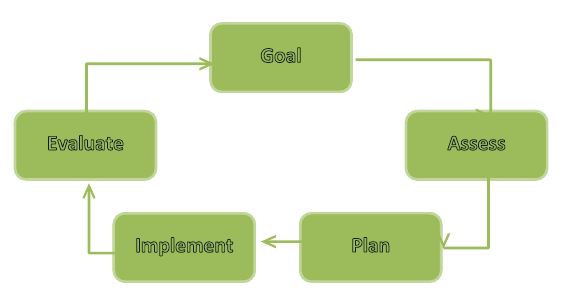
In order to be effective, your social media marketing efforts have to be ongoing. There is no finish line. As you reach goals, you need to create new ones. Otherwise, you’re sure to go backwards. By understanding the importance of having an ongoing social media strategy, you will be ahead of the game from the start. Check out the chart below illustrating the key phases in setting goalssetting goals
Assess the Situation
You need to know where you are in order to get where you’d like to be. With that in mind, you should make the following assessments:

What is Your Main Goal with Social Media?

Stay focused. What do you want your strategy to achieve? There are three broad options: raising awareness, increasing loyalty and increasing sales. Select one and focus on it.
  • Listening – Listen to what others are saying about your business.
Tip: Use Twitter, Facebook & LinkedIn search function to search your brand or product/service. It will populate a list of tweets, posts etc. that others have published. Setup a Google Alert to monitor business mentions around the web.
  • Communicating – This is about getting your message across to your target audience. This could be for you current advertising efforts and making it more socially interactive.
  • Make it Viral / Word of Mouth – Connect with key influences / customers in your industry and make them spread the word. i.e. Retweet, Share, Like, Google +1’s etc.
  • Customer Care – Social Media is fast becoming the future of customer service. You can help your customers with a support enquiry and other customers can help each other.
Example: I tweeted about how frustrated I was not being able to get a HP driver for my printer, even though I contacted them several times via phone and email. Within a few hours, a HP representative contacted me via Twitter to resolve my issue.
  • Understand your customers’ needs – Receive customer feedback and understand the needs of potential customers through a customer feedback form, complaints form or survey.

Identifying Your Target Audience

Who is Your Audience?

Social media is all about connecting with others. First think about your target audience and study/learn about them.
It is important to understand how they contribute in social media and through which mediums. Social media users generally fall into the following categories:
  • Creators: These users are responsible for publishing content such as blogs, websites, video, music etc.
  • Conversationalists:  Update their social networking site by updating their status & posting tweets
  • Critics: Users who actively review and rate products. Make comments on blogs and contribute to content and online forums.
  • Collectors:  Users who vote on websites & add tags to photos.
  • Joiners: These users create social media profiles on social media sites such as Facebook, Twitter, LinkedIn & Google Plus
  • Spectators: They search the web reading blogs, watching videos on YouTube, reading forum posts and tweets.
  • Inactives:  Does not do any of the above.
Through surveys and other data, learn as much as you can about your target customers’ challenges, needs and wants.  Use online survey tools such as Survey Monkey or User Report and read this article to learn more about creating an effective online survey.  By knowing where your audience falls on the spectrum, you’ll have an easier time creating an effective social media strategy.

How to Proceed?

After determining a course of action, put it in writing. Make sure your entire team is on the same page.
In the meanwhile, make sure your goals are specific, measurable, attainable, realistic and timely.

Put Your Plan into Action

With the completion of the planning and assessing phase, you should be ready to implement your social media strategy. The key to doing so effectively is by using a content calendar. This is crucial for keeping you focused and your efforts on track. Assigning responsibility to tasks makes people accountable as well. I found this detailed content calendar (Free download) by Populate Digital.  This calendar will specify the theme of the content that you will use in your campaign, when and where it is shared, who creates it and the mode of delivery.
To enhance your social media strategy, you should plan on using a variety of different tools. Use hootsuite for your social media management. Social media icons and plugins should be added to your website, e-commerce site and on content pages. Make it as easy as possible for someone to share and like your stuff. Promote your social media networks on company emails, letterheads, invoices, business cards and other places. Use promotions and contests/giveaways to engage your target audience and get them involved. Continually demonstrate what you have to offer.
Use paid advertising, such as StumpleUpon Paid Discovery or Facebook Advertising to promote your business outside your reach.
Tip: Make sure your social buttons on your website are visible. Tools such as ShareThis or AddThis are simple plugins that can add social buttons to your website.

Evaluate Your Success

You should give your social media strategy a little time to gain momentum; after about two or three months, you should perform an in-depth evaluation to determine whether your strategy is producing results or not. Specific metrics such as shares, likes, subscribers, click rates, sales that originated in social media channels and conversion rates should be analysed with care.
Monitor your social media engagement through Online Monitoring Tools such as Klout or Edge Rank
Tip: A free tool Google Alerts can help you monitor your brand keywords to listen to what people are saying about you.
If your efforts seem to be producing results, run with it. Don’t just rest on your laurels. Mix things up a little. Now is the time to roll out Facebook ads, live question-and-answer sessions, Google Hangouts and other webinars, contests that span across multiple social media outlets and more.

Wash, Rinse, Repeat

To ensure the ongoing effectiveness of your social media strategy, go back to the beginning and start again. Lay out a new plan with new objectives based on fresh assessments. Implement a revised plan with updated goals. Evaluate its success by analysing specific metrics. By continually going through this cycle and building upon what you learn, you will be able to achieve incredible results through your social media marketing efforts.


7 May 2013

10 Top Social Media Monitoring & Analytics Tools


Social media is quickly becoming a main focus of marketing for businesses. Social media can be an excellent tool to build a community around your product or service, expand your target market, and to listen to what your customers want. It’s clear that social media is valuable, but measuring  ROI proves to be a challenge.
And, with all of the statistics available, it can be difficult to distill what is most important and useful. It can also be out of budget for many businesses to employ an expert or any of the robust reporting tools that are available.
There are some simple ways for monitoring activity on social media platforms. Some obvious ways are internal methods such as monitoring Facebook likes, retweets on Twitter, basically tracking what your customers are interested in and changing what isn’t working. I would suggest making a weekly or a monthly plan outlining status updates and competitions etc. There are also external sites which are ideal for monitoring and analytics.

Useful external sites for social media monitoring and analytics:-

# 1. Social Mention

Social Mention will allow you to track and measure who is talking about you, your company, your product, or any topic related to your industry. Social Mention pulls data from hundred + social media platforms to give you the most accurate, real-time information landscape in real-time.

# 2. Tweet Deck

TweetDeck is an effective and useful tool that allows you to arrange feeds from all of your social networks in one place using the TweetDeck dashboard. You can also schedule tweets and set-up customizable feeds for your social search needs. Lists can also be created of the people you follow. These lists can allow you to manage different target groups you want to interact with and keep an eye on what’s being tweeted about.

# 3. Hootsuite

Hootsuite is my personal favourite. It’s easy to use and allows you to organize and execute campaigns across multiple social networks from one secure, web-based dashboard. Hootsuite enables organizations launch marketing campaigns, identify and grow audiences.
Key social network integrations include Facebook, Twitter, LinkedIn, and  Google+ Pages, plus a suite of social content apps for YouTube, Flickr, Tumblr and more.
Hootsuite’s geo-location and geo- targeting can help get your business more seen on social media platforms. HootSuite also offers tools to help multiple collaborators be assigned to manage your social media accounts more securely. Analytics tools are also available on Hootsuite to get more of an insight into your businesses participation on social media platforms.
Twilert

# 4. Twilert

Twilert is a Twitter monitoring application that monitors all mentions of your chosen keywords across the Twitter-sphere. What’s best about Twilert is that it doesn’t simply monitor @mentions or hashtags, but monitors all words within a tweet. So you will never miss out on anything you are searching for. It’s an easy platform to use for social analytics. You can sign in to Twilert with your Google or Twitter account. The keywords you search can be sent directly to your email address.
What’s great about Twilert as well is that you can do an advanced search for any topic. You can choose a particular geographical area. Maybe a certain target audience you haven’t quite targeted yet that you want to do some market research on, to see if your product or service meets their needs.  You can search by peoples attitude either positive, negative or asking a question.  This could be quite useful. See picture below to get a better understanding of the advanced search tool for Twilert.
# 5. Sprout Social
Sprout Social lets you monitor your business & manage conversations with one simple marketing analytics tool. Publish & schedule updates across social channels with a single click. Manage teams, large social channels, tasks and assignments to make life a bit easier.
Sprout Social allows you to monitor your business efficiently and effectively and help manage&grow your social presence across different platforms. Sprout Social integrates with Twitter, Facebook Pages, LinkedIn, FourSquare and other networks where your target market could be engaging with businesses similar to yours. Other useful tools on Sprout Social are contact management, competitive insight, lead generation, analytics.
Sprout Social offers a thirty day free trial. So give it a try if you think it would be a useful analytics tool for your business.

# 6. Social Oomph

Social Oomph is a useful marketing tool especially for Twitter. Twitter is an excellent way for a business to build relationships with customers and assist in retaining them as well.
There are different tools that will let you manage multiple Twitter profiles and you can configure lots of features such as Auto Direct Message, Auto Follow and Auto unfollow.
If it’s suitable for your business then I would suggest sending an auto direct message to all your new followers. You have more than likely been sent one by someone you have followed. Here an example: Thanks for connecting here on Twitter, will love to see you on Facebook [Link]
Twitter users will usually follow you because you follow them back and later on if they unfollow you. Social Oomph’s Twitter auto unfollow tool will come in handy to help clean up your newsfeed.

# 7. Sysomos

Sysomos another great social media analytics tool for businesses. Sysomos is the greek word for “everything together “. You will be provided with intelligence and insights needed to measure results and ultimately make decisions on what’s working and what’s not working.
Sysomos collects data from blogs, Twitter, social networks, messages, boards, wikis and major news sources. Sysomos give you the ability to notice the tone of conversations and identify opinions by gender, age and location.
Some of Sysomos’ products include: Heartbeat, a social media monitoring and measurement tool. Heartbeat provides constantly updated snapshots of social media conversations delivered using a variety of user-friendly and intuitive graphics. Sysomos MAP, and Traffic Analytics. You can request a demo here.

# 8. Brand Monitor

Brand Monitor is an easy-to-use social media monitoring and engagement platform. Brand Monitor provides a powerful blend of consumer brand choice, multi-dimensional insights and relative acumen. A dashboard is available for you to view weekly trends, reaction meter, posts volume, reaction graph and top referrals. A graph with positive and negative response trends for the past month can also be viewed.
Sentiments can be manually updated and Brand Monitor is capable of learning this and using this information to assign sentiment for future posts. An email can be sent to you daily, weekly and monthly that will keep you updated. Dashboard Charts and other data can be easily exported into an editable Excel sheet or CSV file.

# 9. Google Analytics

Google Analytics is a free Web analytics service that provides statistics and easy to use analytical tools for search engine optimization (SEO) and analytical marketing purposes. There is an endless amount of data available to analyse on Google Analytics. I will recommend some resources that will be beneficial for your business.
  • Monitoring traffic sources: Tracking which keywords are driving the most traffic to your website is essential. Using these keywords then throughout your website will help you rank higher in SEO
  • Monitoring referring sites: Understanding which websites are sending the most quality traffic to your website will allow you to focus more effort and time on those sites, and less of your time on under performing websites.
  • Monitoring the types of visitors: Analysing how much of your website traffic is new visitors against returning visitors? This information will help you run certain marketing activities aimed at new visitors or returning visitors. A dedicated part of your website could be created to inform returning visitors of new products or services available by your business
  • Monitoring popular pages. Analysing what pages are performing best on your website will give you an idea to what your visitors are most interested in and what needs work on your website
  • Monitoring visits. Analysing what days visitors are coming to visit your website will allow you to publish new content or launch a new marketing activity on those days in order to attract the most attention
  • Monitoring geographical location. Google Analytics presents data that will let you analyse the top ten countries that visit your page. This could be useful data for your business that may help you decide on entering into a new market or increase your product or service offering in a new market.

# 10. Google Alerts

Google Alerts is another effective monitoring system to analyse social media. You can track anything you want. It can be a useful way for finding out what’s being said about you or your company. You can keep track of articles you write under your name; monitoring the competition or simply to keep up to date on any given topic.
You can set up Google Alerts to monitor certain keywords, such as your blog name, your business name and your personal name, and you will receive an e-mail any time they find those keywords in their search. With Google Alerts, you can be instantly notified when and where any bad content was placed on any social media platform and be able to respond accordingly.
It is essential for every organization to monitor and track what is being said about them. It is especially important to interact with customers through social media platforms and analyse any areas of their social media platforms that need to be improved and essentially keep up to this on this very fast paced environment.
Obviously there are lots more Social Media monitoring and analytics tools. I’d love to hear any recommendations you have below.

20 Apr 2013

Hootsuite Simplifies LinkedIn Marketing with Company Updates

By Cara Tarbaj at Social Media Today:
The social media management tool Hootsuite has integrated with LinkedIn Company Pages, allowing Company Page Administrators to post Company Updates on the professional social network with Hootsuite. This enables businesses to easily engage with their audience (and the 200+ million users) on yet another social network via Hootsuite.
According to LinkedIn, “Companies that post 20 times a month, on average, reach 60% of their followers with 1 or more updates.” That’s a lot of reach you’re missing out on - but now you have no excuse to leave LinkedIn’s Company Updates behind. No more forgetting to post on your Company Page, it’s all right there on your Hootsuite Dashboard.
What can you do with this integration?
  • Share company news, product updates, industry articles or job opportunities
  • Target a specific audience with tailored messages
  • Manage and organize multiple teams and administrators
  • Use analytics to assist in the growth of your follower community and improve page performance


15 Jan 2013

Must Have Apps for Bloggers

Working remotely is one of the biggest benefits of bloggers. You have the freedom and control of setting up a mobile office with your laptop wherever you please. The increased popularity of mobile devices and the plethora of new apps available allow even more freedom than before. Manage your blog and your business from the comfort of your tablet or smartphone. Read on to learn our top 10 apps for bloggers.


1. Dropbox

Keep your mobile blogging lifestyle by accessing your files no matter where you are. Dropbox allows you to access all of your files from any registered device.


2. WordPress & Blogger

If you happen to host your blog one of these popular blogging platforms, you can conveniently update your site while out and about, read postings & comments, edit postings, manage comments and perform other tasks.


3. PayPal

Many Infolinks bloggers monetize their sites via PayPal. This mobile app allows you to completely manage your Paypal account with a wireless connection.


4. Evernote

Quickly access for easy organization of all your videos, images and other items saved on your phone with Evernote, the archive app.


5. Adobe PhotoShop Express

Easily use the professional photo editing capabilities of Adobe Photoshop to touch up or edit photos and graphics from your mobile device.


6. Hootsuite

Manage all of your top social media platforms including Twitter, Facebook and Foursquare from this easy to manage mobile app. Hootesuite is a great way for you to update all of your social media platforms and monitor what is going on while on the move.


7. SkypeFor important business meetings and phone calls, Skype is the only way to go. Stay in touch with your partners, guest bloggers or anyone else for free with an internet connection and your mobile device.


8. Google Analytics

Google Analytics is a must! Discover who is reading your blog posts, where they are coming from and how many site visits and page views your blog is receiving. Effectively analyzing this data will reveal which blog posts are the most popular to help you optimally tailor your content for the future.


9. Byline

Reading other blogs and articles on the regular is crucial for good bloggers to get even better. With byline, you can read the latest news from your favorite sites and blogs, even when you’re offline. It easily syncs with your Google reader account. Overcome your writing block with this useful app


10. Infolinks Real-Time

Infolinks mobile app, delivers real-time reports so you can always know exactly how your Infolinks ads are performing on your blog. Check on your payments and have a fast connect to our blog and other info as well.


This entry was posted in Blogger Tips


30 Sept 2012

HootSuite Adds Real-Time Chat to Dashboard

By
Social media management tool HootSuite integrated real-time chat onto users’ dashboards Wednesday with the release of HootSuite Conversations, calling the free addition an “epic release” for businesses.

HootSuite Conversations encourages collaboration among employees who switch back and forth between HootSuite’s dashboard and their emails. Now, HootSuite allows any HootSuite user with an email address to start group conversations within the dashboard without having to switch over to his or her email client.

“We wanted to create a private channel to have conversations to increase efficiency and improve return on investment,” CEO Ryan Holmes tells Mashable.

To start a private conversation in HootSuite, users must click on the speech bubble icon on the top right corner of their dashboard. Users then invite co-workers or import their Gmail contacts.


Read the full story here


6 Sept 2012

HootSuite Acquired Seesmic

By Shea Bennett at Media Bistro:
HootSuite, the social media management system, has acquired Seesmic, who were innovators in mobile, desktop and web applications for social media, for an undisclosed amount.
Seesmic chief executive Loic Le Meur had to lay off half of his staff back in March, and this buyout from HootSuite is likely a talent acquisition for the remaining roster. Users of Seesmic software will be slowly ported over to HootSuite, and while an official announcement is yet to be made by either party (although one can be expected soon on the HootSuite blog), this deal is done.

I have fond memories of Seesmic’s Desktop application, which was my first favourite Twitter client. It was, in my opinion, much better than the significantly more popular TweetDeck, and I stuck by Seesmic and sung their praises on this blog (back in the Twittercism days) to whomever would listen.


Then, back in January 2010, they delivered a major update to the Desktop application which, quite frankly, I loathed. And that, as they say, was that. I moved over to HootSuite and never looked back. Loyalty is fleeting at the best of times in the crazy world of technology, especially software, and it’s a risk all developers are well aware of when they move into a new direction.
And that was really Seesmic’s problem as a company – they couldn’t find anything that would really appeal to a wide userbase, and so they kept on changing direction and, more than once, basically started over. People hate change, as we know, but that’s because half the time they have no idea what they want until you show it to them. What people really hate is something that keeps on changing. Then it seems like you have no idea what they want. And that’s a problem, and it’s one that Seesmic couldn’t seem to overcome.

Nobody is perfect, and HootSuite has dropped the ball a couple of times, too. Thankfully, they’ve picked it right back up, but it only takes a few misfires for people to move on. And when your userbase is as big as HootSuite’s, that’s something you always need to be watching really closely.


Read the full story here


25 Aug 2012

Twitter Teams Up With HootSuite To Sell Ads, Preferred Users Get $100 Credit

By Lauren Dugan at Media Bistro:
A lot has been written about Twitter’s latest developer guidelines, which outlines the types of third-party apps the company supports, and those it wants to eliminate.
Called out as being an example of an app the company approved of in its new guidelines was HootSuite, the enterprise-focused social media management tool. And now we know why: Twitter and HootSuite are teaming up to begin selling ads to 30,000 HootSuite Pro customers.

30,000 HootSuite Pro users will see a popup offer when they log in to the dashboard next, with $100 in free Twitter advertising credit offered if they spend it through HootSuite itself.


This is the first move that Twitter’s made to sell ads through a third party.
Here’s a quote that TechCrunch received from a Twitter spokesperson as well as an anonymous source:
“As with all of our advertising efforts, we are being thoughtful and deliberate in how we roll out self-serve to all kinds of small and local businesses,” she said. “We are testing out various ways to roll out this offering, including offers to Twitter users by companies like HootSuite.” TechCrunch understands from a source that this is the first signal that “a deeper partnership between the two may be in the works.”
Twitter is targeting small and medium sized businesses with this promotion, in an effort to continue its self-serve advertising platform rollout. The company first offered self-serve ads to American Express customers in February, expanding this to UK companies who shared their Twitter stories in June.


 Read the full story here