Showing posts with label Klout. Show all posts

6 Apr 2014

Understanding Klout as a Brokerage Business


By Lucy Leiderman at TNW: 


Klout, the San Francisco based start up that measures your social influence, was acquired last week by Lithium Technologies in a deal that is supposedly meant to redefine both companies. Since its launch in 2008, Klout has apparently scored 500 million profiles and handles 50 billion API calls monthly, yet its day-to-day relevance remains a mystery for many.

On the surface, users link available social profiles to Klout in order to be scored. While a possible humble brag, a Klout score doesn’t necessarily translate into something useful. In 2012, Wired suggested candidates in social trades were being disqualified from jobs if their Klout score, depicting online influence, was too low.

As employers turn more to the Web to see if candidates practice what they preach, this may be even more prevalent today. There was also an implication that with a high Klout score, users are less likely to be ignored by customer service when they complain on social platforms, and in contrast, receive perks as perceived social influencers.


Perk-based model


That brings us to Klout’s business platform, which allows companies to offer perks to specific kinds of influencers. Perks are delivered straight into your account (and your email, depending on your communications settings), as an incentive to come back to Klout and redeem your perk.

Klout even lets users scroll through trending perks they didn’t get, in order to see how much social influence resulted from a company’s initiative. The perceived benefits to brands signing on are that when social influencers redeem the perk, the company has a good chance of getting earned media.

While calling a paid campaign’s results ‘earned media’ is contentious, nothing beats honest engagement.


Why Klout is a brokerage business

Klout, however, remains a brokerage with limited use to brands because one very important feature is missing – a feature that could potentially make or break the service. While Klout collects data and statistics on all of its users, there is no option to search for influencers by interest or location.

It’s clear to guess why, though. If Klout allowed agencies or brands to search directly for highly influential people in specific locations with relevant interests, this would cut out Klout completely and connect brands to real people, offering them products or services on other social networks.

Imagine if companies were able to use Klout scores to connect with influencers in any given city and engage them to cover activations? Or if brands launched last-minute stunts and flash mobs by connecting with exactly the right people, who care about the right things, at the right time?

The possibility of measuring social influence, and communicating directly based on that, offers an agile world of marketing capability – greater response rates through more efficient, directed communications.

However, the Klout business model is currently not built to facilitate such campaigns. Companies that strive to adopt a human persona and engage the people who may turn their social tide must go through the middleman if they want access to Klout’s inventory of the movers and shakers of social.

Would adopting such a model demystify Klout’s purpose and existence? We’ll just have to wait and see what Lithium Technologies decide to do with the service.

7 Feb 2014

Klout Just Turned Into A Social News Reader

Klout just got a big redesign. Head over to Klout.com now, and you’ll see a page encouraging you to “Create and share great content.”


The change is billed as being about “creating content,” though as far as I can tell, it’s mostly about sharing stuff. It gives you a news feed of stories tailored to what you supposedly have “klout” in, and then you can share them on Facebook or Twitter, or schedule them to be shared on Facebook or Twitter later. Other people’s stories, that is. You’re not creating here, unless you count creating a Tweet or a status update (though you can also create Tweets/Facebook posts from scratch).

But that’s what Klout’s all about. Get some “mad klout” for sharing something interesting that you came across. With this set-up, you don’t have to come across anything, because it comes to you. It’s a news reader personalized to you but for your followers. It’s about content not necessarily that you’re interested in, but that people who follow you are interested in.


Klout chief product officer Sanjay Desai announced the change on the company blog, saying that the new Klout is the first step towards its vision of helping people be known for “what they love.”


Read the full story >>
http://www.webpronews.com/klout-just-turned-into-a-social-news-reader-2014-02

26 Sept 2013

#INFOGRAPHIC: How To Amplify Your Klout Score


The infographic below is presented by KloutScoreBook.com that provides valuable information on how to increase the Klout Score and boost up sales. Visit http://kloutscorebook.com


How to amplify your Klout Score
Explore more infographics like this one on the web's largest information design community - Visually.

6 Sept 2013

Social Influencer Sites: How Relevant Are They?


Social ranking is nothing new, people have been categorised into classes and groups for years, often allowing others to form opinions of them without having to meet or event get to know them. Sites such as Klout, Kred and PeerIndex now allow people to get a similar ranking, all based on a persons online social score. The only difference between this and real life, is that online, it’s all based around data, but how real and relevant is it, and should brands be taking it into account when planning a social strategy?
One benefit of being able to see how ‘influential’ a person is, is that when you follow or are connected to a large number of people on sites such as Twitter, it allows you to cut through the noise, and find what is most relevant and trusted from your peers. From a brands point of view, when looking to engage with individuals on a one-to-one basis, or event conduct blogger outreach, it’s a great tool, as it allows you to really see who will be able to amplify your brand message, and to who.
What brands must be careful of however, is the relevance of these individuals, and how exactly this message will be spread. Everyone has a different online following and what is really key, is the relevance of the followers, and the context in which the messages will be spread. This is where brands can run into problems, as tools such as Klout and Kred do not provide such a feature. Justin Bieber for example, may have a Klout score of 99, but is he the right person to amplify a message about the next Mercedes? No.
Where brands can use it effectively though, is through examining topics that people are influential about. Ford did this through PeerIndex in 2012, giving free Ford holograms to those most influential about cars and the auto industry. In exchange for this, the user would tweet about the hologram using a specific hashtag, boosting the reach of the Ford Fiesta campaign, whilst also ensuring that message was being amplified by a person who is trusted within the right context.
For me, influencer sites can be used as part of a brands social strategy, but only to drive initial awareness amongst an audience. Providing the brand can discover precisely how relevant the individuals are that they are using through social influencer tools, they will have a strong grounding for extending a message, and gaining brand advocates. Don’t go to the effort of researching however, and they are wasting both time and resources, on an audience that won’t deliver a positive outcome.

18 Jul 2013

5 Ways to Turn Twitter into Your Most Powerful Social Media Tool

Article from JeffBullas.com
What do you use as your daily Social Media dashboard every day?
Most likely not Twitter.com I am guessing.
Yet, in recent months, there were a great number of browser extensions released, specifically for Twitter.com. They help you create a much greater experience right inside Twitter.com.
What I like best about this is that you are in charge regarding how many bells and whistles you are adding. You can basically fully customize your own Social Media dashboard.
So here are my top 5 finds you can use to make Twitter.com a truly powerful Social Media tool for you:

Tool #1. Klout for Chrome

Function: Find top users more easily
There has been a lot of discussion around Klout in the last few months. One aspect, where it helps me greatly to make my daily Social Media life more efficient, is deciding how to best interact.

When I only have a few minutes at hand every morning, being able to glance through my Twitter stream with everyone’s Klout score next to their Tweets is a great filter. It helps me make better decisions and at the same time deepen my most important connections:

Twitter Tool Klout for Chrome


Tool #2. Buffer

Functions: Optimal timing, multiple accounts posting and old school retweets
Another extension I am using every day is Buffer’s Chrome extension. It puts a brand new Buffer button right into Twitter.com next to your Tweet button. If you click it, you can conveniently add any new Tweet to your Buffer to be posted later on at a better time:

Twitter tool Buffer

The extension also allows you to Buffer your retweets, either posting them now in old school retweet style or later on, when more of your followers will be online.

Buffer for Chrome
There is plenty of more places you can now Buffer from on Twitter.com. Personally, I love going through my Twitter lists of top Social Media experts, Buffering everything that’s handy, without flooding my followers.


Tool #3. Pocket

Function: Save your best article finds to be read later
How often does it happen to you, that you come across a terrific article, but can’t read it right now because you are just too busy? From now on, instead of letting it go into Twitter’s limbo, just save it to be read later on with Pocket’s browser extension:

Pocket Twitter tool

This way, you can save any article you are finding on Twitter to a reading list available any time later on for you. Personally, I found this to be a terrific way to just spend a few minutes browsing, and “pocketing” everything worth exploring later on:


Twitter tool Pocket


Tool #4. Tweet Filter

Function: Unclutter your Twitter stream from the noise

One problem I have on Twitter is that it often takes lots of Tweets to glance through, until I spot one that is worth reading. And a lot of the time, it’s not even the people, it’s just that I am looking for certain things throughout the day.

With Tweet Filter, you can easily customize this for your own Twitter stream, getting rid of those Tweets that don’t add any value for you at that moment. Filter out words like “4sq, twitpic or award”. Whatever happens to add little value to you:

Tweet Filter


Tool #5. Embedly

Function: Get full media previews right inside Twitter.com
The last goodie I have for you to really make Twitter.com as powerful as it gets is a neat extension called Embedly. It allows you to expand any Tweet to show you the full article or video view right inside Twitter.com:

Embedly

I find this to be a huge time saver. You don’t have to click through and see if the headline is really what you expected, but you can just read the first few paragraphs right where you discover that content:

Embedly Twitter Tool


5 Quick Workflow Tips To Optimize Your Day On Twitter

Adding those 5 lightweight solutions to your Chrome browser have saved me hours of time every day. In case this helps you at all with your personal workflow, here is how I approach every morning on Twitter with just 20 minutes per day:
  1. Glance through Tweets spotting the best ones using the Klout extension.
  2. Previewing the articles I like best with Embedly right on Twitter.com
  3. Saving those I want to go into more detail with Pocket to read later on
  4. Adding the best Tweets straight to my Buffer as old school retweets.
  5. Filter out any words that annoy me with Tweet Filter (this is something I don’t do daily though)


How about You?


20 May 2013

3 Steps to Creating an Effective Social Media Strategy


Why is social media so important? More people are using social media through their mobile phones, computers, and tablets than talking, calling, emailing and texting. Do you find this surprising? I know I don’t. Some businesses have gone to the extent of allowing 30 minutes a day for their employees to use social media.
There’s a lot more to engaging in social media marketing than creating a few profiles and posting a few links. Without taking a measured approach to the situation, you’re not going to be able to make the most of what is a very powerful and influential strategy. There are thousands of other companies competing for social media users’ attention, so laying the right groundwork is crucial.

Create a strategy you can maintain

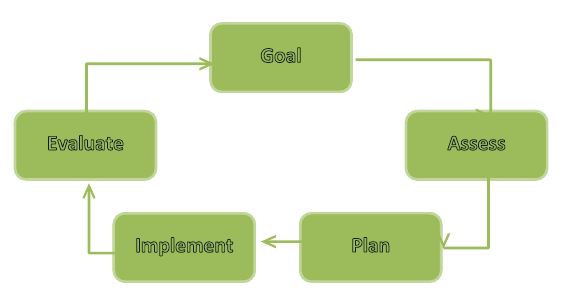
In order to be effective, your social media marketing efforts have to be ongoing. There is no finish line. As you reach goals, you need to create new ones. Otherwise, you’re sure to go backwards. By understanding the importance of having an ongoing social media strategy, you will be ahead of the game from the start. Check out the chart below illustrating the key phases in setting goalssetting goals
Assess the Situation
You need to know where you are in order to get where you’d like to be. With that in mind, you should make the following assessments:

What is Your Main Goal with Social Media?

Stay focused. What do you want your strategy to achieve? There are three broad options: raising awareness, increasing loyalty and increasing sales. Select one and focus on it.
  • Listening – Listen to what others are saying about your business.
Tip: Use Twitter, Facebook & LinkedIn search function to search your brand or product/service. It will populate a list of tweets, posts etc. that others have published. Setup a Google Alert to monitor business mentions around the web.
  • Communicating – This is about getting your message across to your target audience. This could be for you current advertising efforts and making it more socially interactive.
  • Make it Viral / Word of Mouth – Connect with key influences / customers in your industry and make them spread the word. i.e. Retweet, Share, Like, Google +1’s etc.
  • Customer Care – Social Media is fast becoming the future of customer service. You can help your customers with a support enquiry and other customers can help each other.
Example: I tweeted about how frustrated I was not being able to get a HP driver for my printer, even though I contacted them several times via phone and email. Within a few hours, a HP representative contacted me via Twitter to resolve my issue.
  • Understand your customers’ needs – Receive customer feedback and understand the needs of potential customers through a customer feedback form, complaints form or survey.

Identifying Your Target Audience

Who is Your Audience?

Social media is all about connecting with others. First think about your target audience and study/learn about them.
It is important to understand how they contribute in social media and through which mediums. Social media users generally fall into the following categories:
  • Creators: These users are responsible for publishing content such as blogs, websites, video, music etc.
  • Conversationalists:  Update their social networking site by updating their status & posting tweets
  • Critics: Users who actively review and rate products. Make comments on blogs and contribute to content and online forums.
  • Collectors:  Users who vote on websites & add tags to photos.
  • Joiners: These users create social media profiles on social media sites such as Facebook, Twitter, LinkedIn & Google Plus
  • Spectators: They search the web reading blogs, watching videos on YouTube, reading forum posts and tweets.
  • Inactives:  Does not do any of the above.
Through surveys and other data, learn as much as you can about your target customers’ challenges, needs and wants.  Use online survey tools such as Survey Monkey or User Report and read this article to learn more about creating an effective online survey.  By knowing where your audience falls on the spectrum, you’ll have an easier time creating an effective social media strategy.

How to Proceed?

After determining a course of action, put it in writing. Make sure your entire team is on the same page.
In the meanwhile, make sure your goals are specific, measurable, attainable, realistic and timely.

Put Your Plan into Action

With the completion of the planning and assessing phase, you should be ready to implement your social media strategy. The key to doing so effectively is by using a content calendar. This is crucial for keeping you focused and your efforts on track. Assigning responsibility to tasks makes people accountable as well. I found this detailed content calendar (Free download) by Populate Digital.  This calendar will specify the theme of the content that you will use in your campaign, when and where it is shared, who creates it and the mode of delivery.
To enhance your social media strategy, you should plan on using a variety of different tools. Use hootsuite for your social media management. Social media icons and plugins should be added to your website, e-commerce site and on content pages. Make it as easy as possible for someone to share and like your stuff. Promote your social media networks on company emails, letterheads, invoices, business cards and other places. Use promotions and contests/giveaways to engage your target audience and get them involved. Continually demonstrate what you have to offer.
Use paid advertising, such as StumpleUpon Paid Discovery or Facebook Advertising to promote your business outside your reach.
Tip: Make sure your social buttons on your website are visible. Tools such as ShareThis or AddThis are simple plugins that can add social buttons to your website.

Evaluate Your Success

You should give your social media strategy a little time to gain momentum; after about two or three months, you should perform an in-depth evaluation to determine whether your strategy is producing results or not. Specific metrics such as shares, likes, subscribers, click rates, sales that originated in social media channels and conversion rates should be analysed with care.
Monitor your social media engagement through Online Monitoring Tools such as Klout or Edge Rank
Tip: A free tool Google Alerts can help you monitor your brand keywords to listen to what people are saying about you.
If your efforts seem to be producing results, run with it. Don’t just rest on your laurels. Mix things up a little. Now is the time to roll out Facebook ads, live question-and-answer sessions, Google Hangouts and other webinars, contests that span across multiple social media outlets and more.

Wash, Rinse, Repeat

To ensure the ongoing effectiveness of your social media strategy, go back to the beginning and start again. Lay out a new plan with new objectives based on fresh assessments. Implement a revised plan with updated goals. Evaluate its success by analysing specific metrics. By continually going through this cycle and building upon what you learn, you will be able to achieve incredible results through your social media marketing efforts.


12 May 2013

Klout Gets Into The Q&A Business By Launching Klout Experts


So what does a high Klout score actually get you? The influence-measuring startup already offers prizes through its Klout Perks program, and there are bragging rights (unless your friends think you’re a loser for caring about your Klout score). Now Klout is asking users who are influential on a given topic to answer short, factual questions through the new Klout Experts program.
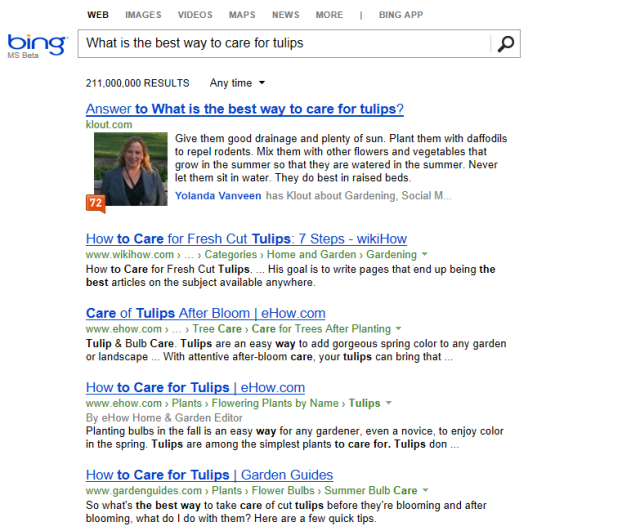
It sounds like the program won’t be rolled out to every user today, but when it is, you might Klout and be prompted to answer a question like “What is the best way to care for tulips?” or “What is the best place to take your date in the city?” You’ll have 300 characters with which to offer your answer. (Why 300? Co-founder and CEO Joe Fernandez said 140 characters isn’t always enough, but he wanted to keep the answers direct and to the point.)
Fernandez told me that Klout is working closely with Bing on this feature, so if there are relevant answers on Klout, they’ll be featured prominently when people search for a given question on Bing. Fernandez said the search engine team is also suggesting future questions that Klout could ask its users. At the same time, while Klout doesn’t have the same cozy relationship with Google, the answers should show up there, too.
For now, Fernandez said he expects most of the Klout Experts traffic to come from Bing, but you can also browse the content on the Klout site itself. The company will be highlighting recent answers from your friends. Fernandez also suggest the on-site experience will improve over time. For one thing, he said users’ various answers to a single question are currently being sorted on a single page by human editors, but Klout is working on a voting system where people can endorse the answers they like — though you can only vote if you’re influential on that topic.
klout bing
Fernandez suggested that this could eventually integrate with Perks and Klout for Business — for example, businesses could start asking their own questions and offer Perks for good answers.
When he described the new feature to me, I asked if people might think he was basically turning Klout’s user base into a content farm. Fernandez countered that these answers are going to be tied to people’s real identities, and emphasized that they won’t be able to post unless they’ve got a good score.
“What we’re good at is understanding the quality of engagement,” he said, adding that Klout scores are “a really good fitness function” for ensuring that people will create high-quality, useful content.
But why is Klout getting into this business at all? Well, Fernandez argued that Klout has become “the standard” in measuring online influence, so now it can start building other applications and uses on top of that system. Klout Experts is the first example of that.
“Influence and reputation is our platform,” he said.
Nonetheless, he also acknowledged that creating the feature has been a bit of a shift, pushing Klout to hire people who have more experience on the editorial side and with user-generated content: “How do we get people from Yelp versus Google Analytics?”
The Experts program is currently focused on technology, food, music and travel. You can view some sample answers here and here and sign up for early access here.

30 Sept 2012

Bing Adds Klout As An Influencer and Vice Versa

By at Search Engine Watch:
Klout and Bing have teamed up to include Klout Scores and influential topics into the Social Sidebar. After performing a Bing search, the "People Who Know" section of the Social Sidebar will now include people Klout believes to be influential about the topic you searched.

Bing believes this will help people connect with the right experts. From the pop-up that appears, you can click through to the influencer's Klout Profile or directly to topics the person influences.


Conversely, over on Klout, some people will notice new items to their Klout profile, courtesy of Bing. Klout will measure two data points from Bing that will be showcased in the "Moments" area.
Influences who appear more often in the Social Sidebar as a result of Search will be recognized for it on Klout. According to the Klout blog, if you have linked your Wikipedia account on Klout, your "profile will also be rewarded for the frequency [you] are searched on Bing." Klout also announced they will continue to add signals generated from Bing searches.


Read the full story here


9 May 2012

10 Things You Didn’t Know About Klout

By Mark Schaefer at Mashable:  
Love it or hate it, Klout and the social-scoring trend are hot. And there’s a lot that’s still unknown about the company that Fast Company just recognized as one of the most innovative in the world.
While researching and writing my book on Klout, I had exclusive access to the inner workings of the company and its customers. Here are 10 things I learned about it that you probably didn’t know.


1. Klout Founder and CEO Joe Fernandez studied English at Oxford University but never received a college degree, although he had more than enough credits to graduate. His first startup was making skate boards, a life-long interest.

2. When Klout went live in December, 2008, Fernandez manually calculated each Klout score.

3. The only person with a perfect 100 Klout score is Justin Bieber. Several celebrities have lobbied for higher Klout scores, including Britney Spears.

4. When Joe Fernandez first pitched his idea for Klout to the startup accelerator panel at South by Southwest in 2009, the idea was rejected because it was not business worthy. One of the panelists, Nova Spivack, later became the first investor in the company.

5. Klout has different influence calculations based on which social media platform you are active on. It also accounts for international differences in communication patterns.

6. A Klout influencer who receives a perk (a gift from a brand) creates an average of thirty pieces of content about that gift. About 80% of the companies who participate in a Klout influencer program sign up for a second one.

7. When Klout received its first round of funding, the first check went to the owner of the Klout.com domain name. Up until then the company was only found on Klout.net.

8. With tens of billions of hits to its API in a month, Klout has at least 50 times more traffic than its nearest competitor, PeerIndex.
 
9. Giving somebody a +K is a nice gesture, but it has no effect on a Klout score.

10. Klout’s first office in San Francisco was in the same building as Twitter.


Mark Schaefer teaches marketing at Rutgers University, blogs at {grow}, and is the author of the new book, Return On Influence: The Revolutionary Power of Klout, Social Scoring and Influence Marketing.

5 Apr 2012

5 Essential & Easy Social Media Metrics You Should Be Measuring Right Now

By Jenn Deering Davis at KISSmetrics: 

So your company is now officially participating in social media. You’ve set up a Twitter account, a Facebook page, even a few Pinterest boards. You respond to customer questions, follow fans, post important news, and thank your advocates for their support.
Beyond that, what are you doing to track and monitor these social interactions? If you’re engaging in social media, then you should be measuring those activities. How else will you know how you’re doing? The good news is it’s easier than you think to measure your social media efforts.
Here are five simple, but oh-so-useful social media metrics you should be measuring right now.

1. Volume

The first – and easiest – social media metric to measure is volume. What is the size of the conversation about your brand or your campaign? Volume is a great initial indicator of interest. People tend to talk about things they either love or hate, but they rarely talk about things they simply don’t care about at all.
While volume can seem like a simple counting metric, there’s more to it than just counting tweets and wall posts. It’s important to measure the number of messages about your brand, as well as the number of people talking about your brand, and track how both of those numbers change over time. For example, Facebook Insights has a useful metric (cleverly called “people talking about this”) that measures how many unique people have posted something to their walls about your brand page.
facebook volume social media metric
Learn when volume is higher – are there days or times when more people seem to be talking about your brand? You can use this information to focus more of your own posts during these times to get more engagement, which we’ll talk about in a minute.

2. Reach

reach social media metrics
Reach measures the spread of a social media conversation. On its own, reach can help you understand the context for your content. How far is your content disseminating and how big is the audience for your message? Reach is a measure of potential audience size.
And of course, a large audience is good, but reach alone does not tell you everything. Reach becomes very powerful when compared to other engagement metrics. Use reach as the denominator in your social media measurement equations.
Pick important action or engagement numbers like clicks, retweets, or replies (more on this in a second) and divide them by reach to calculate an engagement percentage. Of the possible audience for your campaign, how many people participated? Reach helps contextualize other engagement metrics.

3. Engagement

Speaking of engagement metrics, this is one of the most important areas to measure in social media. How are people participating in the conversation about your brand? What are they doing to spread your content and engage with the topic?
In most social media settings, content can be both shared and replied to. Twitter retweets (RTs) and Facebook shares and posts are helpful to know who is spreading your content, while comments, replies and likes are helpful to see who is replying to your content. Think carefully about your goals with social media. Are you focused more on generating interaction (replies, comments) or on spreading a message (retweets and posts)? Be sure you’re using metrics that reflect what’s important to your brand right now.
twitter engagement metric
And are there types of content that generate engagement? Start paying attention to what messages generate the most replies and RTs. It might surprise you what people interact with; it’s not always what you expect.

4. Influence

Who is talking about your brand and what kind of impact do they have? Influence is probably the most controversial social media metric; there are myriad tools that measure social influence, and they all do it in different ways. But one thing they all agree on is that audience size does not necessarily relate to influence. Just because someone has a lot of friends or followers, that does not mean they can encourage those followers to actually do anything.
Based on past actions, we can make assumptions about how influential someone might be in the future. This type of potential influence is useful to decide who to reach out to when you’re preparing for a campaign. Tools like Klout and PeerIndex assign people an influence score. Tools like these measure online social capital and the (potential) ability to influence others.
influence metric
Kinetic influence, on the other hand, will help you understand who is participating in and driving conversation about your brand and your campaigns, and who gets others to participate in these specific conversations. You can find your brand advocates by focusing on people whose messages are amplified by others, and not just who has the most followers.

5. Share of Voice

Finally, to really understand how well you’re doing on social media, you should consider a share of voice metric. How does the conversation about your brand compare to conversations about your competitors? Determine what percentage of the overall conversation about your industry is focused on your brand compared to your main competitors. And learn from your competitors’ successes; since so many of these social media conversations are public, you can measure your competitors’ impact just as easily as you can measure your own.
share of voice metric
Consistency and preparation are essential to effective social media measurement. Pick your favorite metrics and start tracking them now. Use the same formulas and tools to calculate these numbers every week or month. Track your numbers over time and pay attention to how they change. If you see anything that looks higher or lower than what you typically expect, investigate it. By measuring – and paying attention to – these five social media metrics, you’ll be able to better understand the impact and effectiveness of your social media activity.


About the Author: Jenn Deering Davis, Ph.D., is Co-Founder of Union Metrics, the company behind TweetReach, a Twitter analytics provider. You can find her on Twitter here @jdeeringdavis.

18 Feb 2012

INFOGRAPHIC: Got Klout? Measure and Increase your Brand’s Online Influence

Via KISSmetrics:
It could be said that the greatest strength of social media is its ability to easily share and spread messages. This ease of communication also seems to be its greatest weakness. Ease of use breeds noise. And the line between industry leading rockstars and bandwagoning attention seekers becomes less defined.
Stage right: Klout. Designed to cut through the commotion, Klout provides a platform to identify industry experts and keep track of the topics you care about. What follows is a brief history of Klout and how you can increase your brand’s online influence. Special thanks to @klout and @askaaronlee.

28 Jan 2012

INFOGRAPHIC: Klout Score vs. Retweets

Published by ooomf at Visual.ly: 
Check this Infographic designed and published by Ooonf showing your Klout Score vs. number of your tweets retweeted.


via

28 Dec 2011

INFOGRAPHIC: Klout's most influential "Players" in Marketing

Via WhatTheKlout:
The December 12, 2011 issue of Advertising Age profiles the “most influential players” in marketing as part of their annual “The Book of Tens” issue.  Since we’re all about Klout we thought, “wouldn’t that be interesting to rank them by online influence using Klout.com?”  “Yes” we said that to ourselves.  In looking into this further we found that only three of the ten influencers are on Twitter.  That’s no crime, but maybe not a fair comparison.  That’s why we also pulled in each influencer’s brand’s Twitter account as well. Some of the numbers are suprising low considering the resume of some of these companies, others are convincing on why they should be there.