By Teddy Hunt at Social Media Explorer:
In this modern world, if you aren’t online, you don’t exist. A Microsoft study found that 79 percent of employers will research their job candidates online. Perhaps even more startling, 70 percent say they rejected a potential employee based on what they found. Read on to learn about my five best apps to ensure your online image is represented professionally.
The Heavyweight of Professional Networking Apps

The LinkedIn app allows you to potentially connect with more than 175 million professionals, and that number is growing by two new members every second. Of course it’ll take a significant amount of effort to do so much smartphone schmoozing, but the ability to connect to so many people in your past and your potential employment future on the go is exciting. No wonder the mobile site is LinkedIn’s fastest growing service.
The app allows you to post an online resume, which can be viewed by anyone in the LinkedIn community. The mobile app also makes job searching very discrete. If something looks interesting while you’re in the office, just save it and submit your application once you’re away from prying eyes.
You’ll also have the edge in your next interview if you let LinkedIn synch with your calendar. You can easily click through to the profiles of the people you’re meeting and learn a little about them. Armed with that extra knowledge, and the skill endorsements from your personal network, you might just land that next gig.
Plaxo
A Platform that Constantly Synchs Your Contacts

Smart phone apps might be fairly new technology, but some of the websites they stem from are online pioneers. One such app is Plaxo, the mobile version of a site that launched way back in 2002. Its social networking arm became “old hat” pretty quickly, but its contact management system is still one of the best. That goes double if you’re willing to pay for it.
Plaxo’s happy to import all your contacts from a range of sources including Gmail, Facebook, and your phonebook. It synchs constantly, so you needn’t worry about manual updates whenever you rub shoulders with someone new. It also recognizes duplicate contact info and merges the results without you ever worrying about it.
The Personal Assistant updates any out-of-date or missing information using details from Facebook, LinkedIn, and the White Pages. But of course, you pay extra for that. The Platinum Sync feature also attracts fees.
Plaxo works as a bare-bones system, but it’s those premium features that might have you really salivating.
Smartr
The Smarter Way to Connect Email with Social Networks

If you’ve ever spent time scrounging through your inbox for a vital piece of information before a meeting, then Smartr is the app for you. The app, which is iPhone, Android and Blackberry compatible, searches through your inboxes for key details concerning your interactions with your professional network. There’s a Pro service for a fee, but unless you’re desperate for the proprietary cloud backup, you’ll probably be happy with the complimentary download.
That free version really does plenty, especially if you’re active on a variety of platforms. The history tab is very convenient, and the mutual connections feature is ideal for networking. You might also like the way the app presents a new e-mail contact’s Twitter and Facebook profiles for easy connection.
To call it a “Magic Address Book”, as the Smartr team does, might be overstating the point. But this app certainly does more than the notepads gathering dust in your drawers, and its minimal data usage works well with plans like the ones you’ll find on http://clearwirewimax4G.com/plans.
Tweriod
For Maximizing Your Professional Tweet Time

Tweet too much and you risk overexposure. Tweet too little and you’ll be quickly forgotten. Tweet just the right amount and you’re probably using Tweriod.
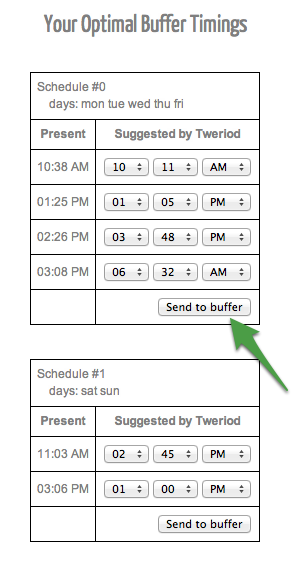
With 56 percent of employers admitting they check the social networking accounts of prospective employees, it’s important to tweet right. The Tweriod app alerts you to the right time of day to tweet based on when your followers are online. This information ensures your 140 characters will reach the widest audience. You’ll never be ignored again, and you could even go viral!
In the wrong hands, it could be used for shameless self-promotion, but Tweriod is really a guide for effective tweeting. What’s the point of expressing your wit in such a pithy way if no one hears it? Surely those potential employers will be impressed when they see how often you’re retweeted. They’ll probably also appreciate the restraint you’ll show just by tweeting in prime exposure time!
Ning
Allowing You to Create Your Own Professional Network
It probably won’t be the subject of a Hollywood blockbuster any time soon, but the Ning platform allows you to create your very own Facebook. The app helps you play Mark Zuckerberg for your own online community of other professionals, clients, and business owners in your field. In this online space you can share ideas and network without the cocktail hangover.
Switching between the mobile and desktop versions is a bit clunky, but generally the mobile site is easy to use and set up for your personal network. It’s a shame the mobile site doesn’t offer more personalization, as branding is so important for professionals, but this too is a minor nit-pick.
If you’re a keen Ninger, it can be overwhelming keeping track of so many separate groups. While Facebook brings all your contacts from many walks of life together, the Ning sites work as stand-alone networks. However, Ning fans say it’s worth a little inconvenience to stay in close contact with their professional communities. Creating your own social network might not bring you Mark Zuckerberg’s riches or profile, of course, but it can’t hurt.
Why neglect (and potentially suffer from) your online image when it’s so easy to create a professional online presence? The last thing you want to do is have a client or potential employer see something NSFW because you failed to manage your image and network.