Showing posts with label Flickr. Show all posts

13 Sept 2013

How #iOS 7 Delivers For the Social Addict

Social applications on mobile devices live or die on ease of use. Speed, performance and efficiency matter. So what do Apple's iOS 7 and new devices like the iPhone 5S bring to the table for the social user on the go?

Shoot More, Share More

Updates to the iPhone 5S camera announced today will no doubt appeal to amateur photographers and videographers. Users can now take better quality photos and videos with their iPhones. New camera features such as built-in image stabilization and standard filters will make for faster taking, saving and sharing of images.
More users are posting photos and videos online, and Apple is catering to those users by integrating Flickr and Vimeo into iOS 7. Users will be able to sign in to the photo- and video-sharing networks via the built-in settings application, which means easier access to the services similar to what iPhone users already enjoy with Twitter and Facebook. Apple ditched its native YouTube video app almost exactly a year ago, and Vimeo is a logical replacement given that it's YouTube's most serious competitor on the Web. 
Flickr integration will make it easier to share and save photos with a single click. With the new integration, we'll probably see instant login-in options for a variety of App Store apps, like Instagram, using Flickr.
Both of these applications could see user growth as a result of being a standard social application on Apple’s mobile devices. 

Twitter Integration

Shared Links in Safari populate with links Twitter and Apple think you might find interesting.Shared Links in Safari populate with links Twitter and Apple think you might find interesting.
When Apple launched iOS 5 back in 2011, its social network of choice was Twitter. Apple fully integrated it into iOS, simplifying the process of sharing photos, videos, and articles. Mobile Twitter signups immediately tripled. The launch of iOS 6 in 2012 included Facebook integration, making it easier for users to share directly from their devices. 
But with the release of iOS 7, the two social networks are once again on an uneven playing field. Twitter is receiving a slew of updates that Facebook won't get, at least not yet. It's not clear whether preferential treatment is Apple policy or not, but for the moment, Twitter is clearly getting some additional love.
For instance, in iOS 7, Safari will feature Shared Links, a list of articles shared by people you follow on Twitter that are suggested by Apple and Twitter. Siri is getting Twitter integration as well, allowing users to verbally search what people are saying about topics and she (or he) will show users the resulting tweets. Siri can also post directly to Twitter, giving users a hands-free social experience.
Twitter also made its way into the new iTunes Radio, a Pandora-like service for Apple devices. The radio application features over 200 genre-focused stations, one of which—"Trending on Twitter"—plays the most popular songs on the social network.

Speed Up Your Social Life

Additionally, Apple announced a new 64-bit processor for the new iPhone 5 that will make posting, saving and sharing faster. Although the processor is geared towards gamers, general users will see an impact on the load times of their favorite apps. 
The new background application refresh option makes sure social media feeds are kept up-to-date, even when you’re not actively using them. This eliminates the time suck and annoyance of waiting for feeds to refresh when users want to see the latest posts from their favorite social networks immediately.
iOS users on devices other than the iPhone 5 can expect to connect to friends quicker on iOS 7. Social applications will load 11 percent faster on the new operating system, according to a report by application testing start up Appurify. The company took a look at the most popular social applications on the App Store and compared performance of the apps on iOS 7 to iOS 6 and determined that users can expect up to three seconds shaved off load time for many of their favorite apps.

30 Aug 2013

Flickr Launched Big Improvements For #iPhone Users

Yahoo announced today that it is launching a new photo taking experience for iPhone users aimed at taking better advantage of what the device’s camera has to offer. The iPhone 5, by the way, is the most popular camera on Flickr.

“In our view, taking a photo should be an enhancement of what you’re experiencing and seeing through your device,” says Markus Spiering, Head of Product at Flickr. “We’ve come up with a camera that gives you full control over how your final photo looks, even before you snap the shot. Our goal is to make it effortless for you to have a beautiful result, with simple but powerful features.”

Yahoo is taking advantage of recent acquisitions like GhostBird Software and KitCam to improve Flickr. Much of what they’re adding now comes from these.


Read the full story >>


22 May 2013

How To Copy All Your Instagrams To Flickr


Instagram’s exploding popularity is having long-time iPhoneography buffs pay notice and watch in horror as mainstream users cannot get enough of its crappy filters and the obscenely low 612×612 pixel resolution. And with Facebook and Android now in the picture, no wonder some early adopters go to the extremes of closing their account while others, like Apple’s marketing honcho, stopped using Instagram for it“jumped the shark”.
To the most ardent fans, the last straw was Instagram’s confusing handling of the recent terms of service changes - even if it was much ado about nothing.
If you’ve been seriously contemplating importing your Instagrams over to Flickr but were put off by the tedious manual uploads – worry not, turns out there are a few ways to get that job done without too much fuss. iDB has you covered with this quick guide to bringing in all your Instagram photos to Flickr with just a few clicks…
I’ve tested a bunch of services which take the pain out of importing Instagram snaps into Flickr, having narrowed the choices down to two super simple web apps. The whole process boils down to authorizing a service to access your Instagram and Flickr account, choosing where to import the images on Flickr and setting your album privacy.
That’s all there is to it, really.

Flickstagram

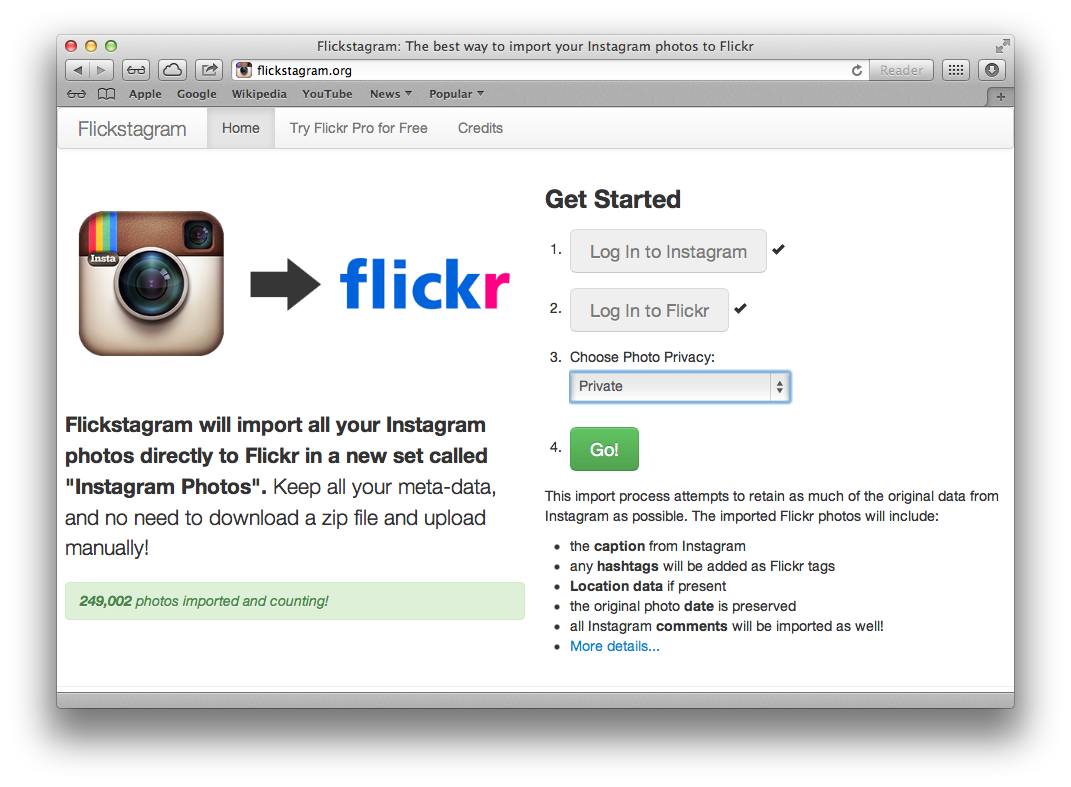
Flickstagram is easy. Just sign in with both your Instagram and Flickr account, choose a privacy level for the imported photos (Public, Friends and Family, Family or Private) hit the Go! button and walk away.
Flickstagram (screenshot 001)
Flickstagram lets you set your Flickr set’s privacy level prior to importing.
A few moments later, depending on the size of your Instagram library, all your Instagrams should appear in a Flickr set titled ‘Instagram Photos’. Of course, your Instagram photos are kept intact and will continue to be available online.

Free The Photos

Free The Photos is powered by CloudSnap and is very similar to Flickstagram. Upon signing in with both your Instagram and Flickr account, check the “Alert me once my migration finishes” box and type in your email address where you’ll receive an alert once the migration is finished.
Hit the big Free Your Photos button and you’re done.
Free The Photos (screenshot 001)
Free The Photos notifies you via email once it’s done importing your Instagrams.
Note that imports take anywhere between a few minutes to hours. Your mileage will vary depending on the size of your Instagram. And privacy freaks needn’t worry: neither Flickstagram nor Free The Photos will store, keep or use your photos or data because everything is streamed directly from Instagram to Flickr.
And because both services preserve meta data, the imported Flickr photos will include your Instagram captions, comments, location data and the original photo date. Even Instagram hashtags get converted to Flickr tags, which is a nice touch.

Flickr Gets A Makeover — It's Been Supersized And Instagrammed


It wasn’t that long ago that Yahoo stood accused of letting Flickr decay beyond repair. 
Today, under the guidance of new CEO Marissa Mayer, the company has given the oft maligned image-sharing community a major facelift. Yahoo’s announcement promises a Flickr that’s “more spectacular, much bigger, and one you can take anywhere.” 
Ladies and gentlemen, welcome to the grid. Here’s what’s new on your Flickr account:

Room To Grow

As recently as yesterday, free Flickr users could upload and display 200 images at a time. Now every user has one terabyte of storage space. For those of you playing along at home, that’s enough for roughly 200,000 photos. Or as the Flickr staff puts it even more dramatically, “you could take a photo every hour for forty years without filling one.”
Following Flickr’s consistently freemium model, you can get even more perks by going pro. Fifty dollars will remove all advertisements. And for the serious professional, $499.99 will double your storage space to two terabytes per year. Or, you know, more than 400,000 photos. 
If you already had an original Flickr Pro account, priced at $24.95, you’re getting a heck of a deal. Yahoo has upgraded you to the $49.99 option until August 2013, free of charge. Pro user Aaron Brazell sent us a screenshot of his pro account, pictured below:

Introducing The Grid

The most instantly noticeable change is an aesthetic one. Your photos have enlarged themselves to jaw dropping size and now dominate the screen. Taking a cue from Instagram, your home page is now an infinite scroll through your contacts’ recent photos.
Your profile page has also gone the way of Pinterest and Windows 8, filling the page with a grid of images. Just like Facebook and Twitter, your profile page includes a background photo to offset your profile picture. 
I found that Flickr had already put one of my Favorites as my background image, a photo I didn’t even take myself. As it’s not credited, I certainly hope the photographer doesn’t take issue.

Wait, What’s Going On?

A lot here has changed and Flickr power users are still trying to figure out what’s new. Flickr’s most active discussion forum, Flickr Central, is abuzz with comments about the change. Given that these are the people that continued to daily use Flickr even as the rest of the Internet complained it was dead, it’s no surprise they’re unhappy with the change.
“I signed on Flickr to post a story about Yahoo vowing not to screw up Tumblr … and then I see the clusterfuck that is the new homepage,” one user wrote. 
Meanwhile, confusion abounds at Flickr’s official Help Forum. I’d be amazed if the staff can answer all 1,100 plus questions that were added in the last hour. It looks like Yahoo might want to update Flickr’s FAQ guidelines, which still link to old news like the ability to pay $24.95 for a pro subscription.
If you're confused, don't add to the backlog. I have reached out to Yahoo for details on when the new FAQ will be up and will update when we know more. 

25 Feb 2012

INFOGRAPHIC: Every 60 seconds in social media

By Jennifer Van Grove  at VentureBeat: 
A single minute may be barely enough time to construct a rational thought, but it’s time enough for social media denizens to inundate the web with their status updates, tweets, checkins, and photos.
Every 60 seconds in social media, two million videos are viewed on YouTube, 700,000 messages are delivered by way of Facebook, 175,000 tweets are fired off into the ether, and 2,000 Foursquare check-ins tell the world where we are.
If the volume of all this social media activity doesn’t astound, perhaps a visual representation of the data will put things into prospective.
Social Jumpstart, a social media resource for small business, has created an infographic, to add color to the wealth of publicly available data on the hottest social networks and applications of our day.

Flickr disables Pinterest pins on all copyrighted images


By Jennifer Van Grove at VentureBeat: 
As the third most popular source of content on digital pin-board site Pinterest, Flickr and its photographers are subject to frequent acts of copyright infringement. But a site-wide update to Flickr promises to better protect members and their copyrighted works.
The Yahoo-owned photo-sharing site has just added Pinterest’s newly introduced do-not-pin code to all Flickr pages with copyrighted or protected images.
“Flickr has implemented the tag and it appears on all non-public/non-safe pages, as well as when a member has disabled sharing of their Flickr content,” a Flickr representative confirmed to VentureBeat Friday. “This means only content that is ‘safe,’ ‘public’ and has the sharing button enabled can be pinned to Pinterest.”
Pinterest, as a refresher, is the digital pin-board site that encourages members to “pin,” via bookmarklet, the products, recipes, clothes, photos, and other items they love to collections called boards. The private beta site has grown into one of the most-trafficked social networks online.
The site has also given birth to the most inherently viral variant of the status update yet. This new breed of update, however, often promotes piracy as pins including copyrighted works spread from person to person.
To protect itself from copyright lawsuits, and appease disgruntled photographers and publishers, the young social media company introduced a snippet of code Monday that website owners can now add to their sites to prevent unwanted pinning. If a person on Pinterest attempts to share something from a site with that code in place, she will see a message that reads: “This site doesn’t allow pinning to Pinterest. Please contact the owner with any questions. Thanks for visiting!”
Flickr can’t prevent all acts of photo piracy just by enabling the code — determined sharers will just work around the inconvenience and manually download and post images — but the act signals the site is proactively looking out for its photographers.

22 Feb 2012

Flickr Gets a Makeover, Looks Like Pinterest

By at Mashable:
What Flickr Looks Like Now
Notice all the white space surrounding the photos in the stream. You see photo titles and can select which size you'd like to view photos.


Justified View: Flickr's New Photo Viewer
Flickr's new photo viewer, which will go live Feb. 28 with your contacts, looks a lot like Pinterest. Photos are arranged closely next to each other and scroll endlessly, without redirecting to new pages.


Uploadr: Flickr's New Upload Feature
Flickr's new upload feature, which will go live in the end of March, lets you drag groups of photos from files on your computer onto the site.

 See more new features here

13 Aug 2011

Flickr Updates Contact View, Adds Light Box Feature And Keyboard Shortcuts

The photo-sharing service Flickr has added some new display options and a guide to keyboard shortcuts to help users swiftly navigate around the service.
Flickr has given users the option of selecting photo size right inside of the stream for their contacts’ recent uploads. Previously, to get all sizes of a photo, a user would have to click on the picture to visit a new screen, but now they can do it right from their feed. Users can view square, small, medium or large photos with this option.

5 Aug 2011

Flickr hits 6 billion total photos, but Facebook does that every 2 months

Popular photo-sharing website Flickr announced on Thursday that it had surpassed the 6 billion photos, reaching the milestone in just under seven and a half years.
Flickr says that over the last five years, uploads have increased 20% year-over-year, a respectable growth rate. The company is quick to point out that its tagging, camera data, groups, comments and favourites make the photo sharing website unique, perhaps in light of its small footprint compared to other photo sharing websites.
In comparison, Facebook counted 10 billion uploads by October 2008, around four years after it launched, surpassing 60 billion uploads in February 2011. A Facebook spokesperson told us today that the company is facilitating 100 million photo uploads a day, meaning that it can easily amass the same amount as Flickr’s total photo uploads in just two months.

21 Jun 2011

iPhone 4 Is Now The Most Popular Camera On Flickr

More people now shoot pictures with an iPhone 4 than the top DSLR’s from Canon or Nikon.
The new list of top cameras on Flickr is as follows:

27 Apr 2011

Viewdle releases SocialMedia Camera for Android, with instant photo 'Tag' and 'Share'


Visual analysis company Viewdle this morning launched an Android app called SocialCamera that allows users to instantly tag photos, add captions and share them on Flickr or Facebook, by email or

23 Apr 2011

Get Free Stocks Photos For Your Blog


Isn't it more fun when you're put photo on your blog posts, right? at least it'll looks more colorful than you're not at all, because people like photos. However there's so many ways to finding photos for your blog, at least if you want to do it legaly. Anyway, I have Google searched accrosing the internet and found lots of sites to get pictures. Here are couple of free photo sites

1. Flickr

It is almost everybody knows about this site with their main purpose as photo management and sharing application. A good place for searching a quality pictures, most all of them are free legally. But you need to check author’s license at least, before using them for safety.

2. EveryStockPhoto
The site that until now this writing they have more than 8 millions stock photos. These come from many sources and are license-specific. You can view a photo's license by clicking on the license icon, below and left of photos. Membership is free and allows you to rate, tag, collect and comment on photos